Category Archives: Used-Line.com

Six Top Reasons for Listing your Inventory on Used-Line.com

Please Share


Here’s the windup...

BaseBall Windup

Baseball Windup (Microsoft Office Image)

You mean you need a reason? Ok, so fine, we’ll give you six reasons. All six reasons are based on points that Used-Line customers have already made about Used-Line’s portal for used test, lab, and semiconductor equipment.

Used-Line appreciates customer feedback, both positive and negative. Well, mostly positive! But we are always ready to learn from our customers.

Let’s make one thing clear. There aren’t only six reasons for listing your equipment on Used-Line.com. We’re simply listing the TOP six reasons here. Our blog post would become a lengthy dissertation if we were to list them all. And you would probably get the point by the time you read Reason #73.

The six reasons we chose are those that we garnered from our customers’ feedback. You can read what our customers have said in their own words in our customer testimonials. Thank you, Used-Line customers!

…And here’s the pitch.

Baseball Pitch

Baseball Pitch (Microsoft Office Image) 

1. EXPOSURE

Used-Line exposes you to a large potential customer base. Used-Line visitors, whether dealers in the market for buying or selling equipment, or private buyers and sellers, learn to trust those users they conduct transactions with on Used-Line. It is easy on Used-Line to build your own network of long-term trustworthy dealers and customers because of the solid framework for conducting your business and because of the vast selection of equipment listings.

2. ADVERTISING RESOURCES

Billboards. Banners. Listings. Your own promotions.
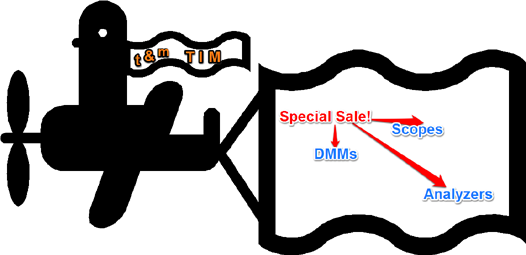
Plane Banner

Plane Banner (Edited Microsoft Office Image)

The advertising packages available on Used-Line are both numerous and flexible. You can be up and running in a few minutes. A first-time visitor to the site can advertise his equipment in a listing right away, simply by completing an online form. For our more sophisticated brand boosting options or for a custom-designed strategy, you can contact a Used-Line Sales Rep directly. Used-Line understands that its users have many different requirements and budgets and, as a result, Used-Line offers many flexible options.

3. EXPANDING BORDERS
There is no need to restrict your customer base to a couple of city blocks.
Of course, borders in our world have fallen away with the globalization of markets via the Internet. However, Used-Line’s international Dealer Directory provides instant contact with a vast listing of registered dealers from all over the world. This both broadens your customer base, and gives you access to hard-to-find equipment that may be available in locales at a distance from your physical location.

4. TRIAL PERIOD
The one-month free trial of Used-Line advertising lets you test the system and examine your results. You should be able to gauge the potential ROI during this first month, as well as view your results with the Used-Line Statistics feature.

5. PRICE
Price means different things to different people. Price can mean the cost of your expenses for selling equipment via Used-Line. Price can mean the selling price of your equipment. Whatever it means to you, on Used-Line, you can find the price that works for you. If your equipment is on the lower end of the pricing scale, you will be able to find a pricing scheme for selling your equipment that may cost you nothing or next-to-nothing, but which will get you top dollar for your equipment. On the other hand, you can choose a budget-friendly package with the best results for selling your high-end equipment.

6. CUSTOMER SERVICE
A smile. A fast response time. Friendly advice. Flexibility. Full attention to your specific requirements. Professional. Goes the “extra mile”.

Need we say more?

Please Share

On Views, ClickThroughs, and RFQs: Tracking your Listings on Used-Line

Please Share

If you’re wondering why your listings on Used-Line.com generate many VIEWS, but a very low CTR (Clickthrough Rate) with a decided lack in RFQs, then you are asking the right questions.

How do you check if your ad (listing) is getting the views but not the clickthroughs?

Used-Line now offers a Statistics service that can show you all the activity taking place on your listings – both individual and overall listings. We previously discussed how to write a good sell ad for Used-Line. Now let’s find out if you really do need to work on your ads – or if, in fact, you are doing OK.

The new Used-Line Statistics service can tell you how your listings are doing by providing you with:

  • Instant views of the effectiveness of your listings overall
  • The ability to drill down into the specific statistics of individual ads

Okay. So how do we retrieve all this important information?

To view overall Statistics of all your Used-Line listings for each month

  1. Log in to your Used-Line account.
  2. To view overall statistics of all your listings, click Statistics under My Used-Line on the left side of the page. View statistics for your total listings for each month in the following four graphs:
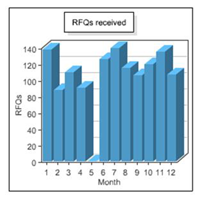
    • RFQs received: Indicates how many Used-Line buyers sent you a Request for Quote (RFQ) for items you advertised.

      RFQs received

      RFQs received

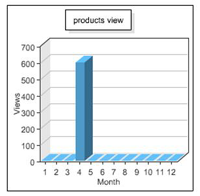
    • Views – product pages: Indicates how many potential buyers saw your postings.

      How many users viewed listings

      How many users viewed your postings

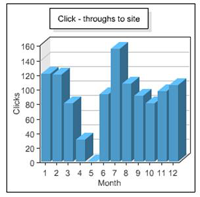
    • Click-throughs to site: Indicates how many Used-Line visitors visited your company website.

      Number of click-throughs to your site

      Click-throughs to your site

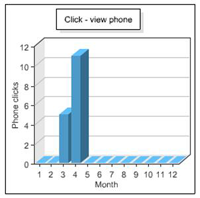
    • Click – view phone: Indicates how many Used-Line visitors clicked the Seller phone number button in your ads.

      Number of users that clicked your Phone button.

      Number of users that clicked the Phone button.

To view statistics for your individual listings

  1. If you have not already done so, log in to your Used-Line account.
  2. To view individual listing statistics, click My Ads under My Used-Line on the left side of the page. Each ad is in the ItemID column in the My Ads tab. You can view the specific statistics for each of your ads in the four columns to the right of the ItemId column:
    • Views: The number of potential buyers that viewed the ad since it was first posted
    • Site: The number of Used-Line visitors that visited your company website by clicking the Visit Website button in the ad
    • RFQ: The number of RFQs that have been sent for the item you described in the ad
    • Phone: The number of Used-Line visitors that have clicked the Seller phone number button in the ad

Note: At times, you may want to update a listing because of new or changed information. This is fine, as long as you realize that your listing will be reset. When a listing is reset, the statistics for that listing are reset. As a result, only the statistics for the most recent version of your ad will be shown.

So, let’s get tracking!


Please Share

Why not rent? (Part two of two)

Please Share


In the last blog, I introduced a  February 2013 Scope Junction article that delivers the results of a survey on scope rentals. Readers were asked how often they had rented an oscilloscope. Of the 152 users who responded, more than 53% answered in the negative – they had never rented a scope.

Part One of this blog discussed a couple of points to consider if you are thinking about renting or leasing equipment instead of purchasing. Affordability was weighed against cost-effectiveness and the number of variables that can impact the ultimate cost of an instrument . As well, predicting the future of the industry was considered a factor in rental decisions.

Here are a couple more considerations.

Flexibility. You can rent state-of-the-art equipment that your budget does not allow you to purchase. For specific projects with stringent high-end specification requirements, a short-term rental lets you perform specialized tasks that you normally would not be able to run without the unique instrumentation features or specifications required for them. And – without breaking the bank. Although the flexibility of this type of short-term rental is attractive, it does demand more than a comfort level with the specs in order to match those required by the project with the capabilities of the instrument you intend to rent.

Test-drive an instrument. While renting, you can gauge an instrument’s performance strengths and weaknesses in your lab. Many instrument dealerships offer both rental and leasing terms. After leasing for a particular time period, you may be offered purchasing options at reduced terms. At this point, you should be able to clearly assess the suitability of the instrument as a permanent fixture in your lab.

And now for a little bonus tidbit. Or should I call that tipbit?

How to Find Dealers that Rent Out Equipment on Used-Line.com

The Used-Line Dealer Directory lists more than 900 dealers. How do you locate those that do offer rental equipment as one of their services?

  1. On the Used-Line.com home page, click DEALER DIRECTORY in the column on the right side of the page.
  2. In the Dealer Directory, use the filter on the left side of the page to choose the type of equipment you need: T&M, Lab, or Semi.
  3. Narrow your search further by Location and by product Specialization.
  4. Open the Services list, then select Rentals to view all the companies that offer rentals in the type of equipment you need.

    DD Services with Rentals

    DD services with rentals


Please Share

How to Write a Good Sell Ad on Used-Line.com

Please Share

Okay, all you equipment dealers out there. It’s time to put on your marketing caps. I know that Copy-Writing 101 was not on your Engineering Degree Curriculum. Or was it? In fact, I had to pass a compulsory technical writing course before I could graduate with my Electronics Technician Diploma. By the time I realized my lifelong dream of soldering resistors and caps onto circuit boards, it was 1990. By then, college curriculum planners, those prophets of trends in marketing and everything else, could already envision the day when their students would unplug their soldering irons, frequency counters, and scopes to don their sales or marketing caps – and suits.

So now that you are spending your days writing advertising copy, where are all those anticipated RFQs? Could it be that our users are not clicking through to view your ad?

Reasons that an ad may not succeed

  • No details
  • No price listed
  • No image
  • Item not actually in stock

Well, I know, that doesn’t tell you much. In fact, I rest my case. It’s almost a carbon copy of an ad that is not going to bring in the RFQs. So, let’s see what we can do about this.

How to to generate interest in your ad

Include a description, not just a title.

  • Key specs: A potential buyer may not need to know the formula for calculating the aperture frequency accuracy of a used network analyzer right off the bat; however, he will at first glance be interested in a little more than only the frequency range of the instrument. Depending on the complexity of the instrument, three to five key specs are all you need to encourage a buyer to look deeper and request more information.
  • Configuration information and options included: Can you throw in the CD Player without the special trim hubcaps? In the days when most vehicles sported cassette players, and a CD player was considered a luxury item, this double item option was offered to me on a new Chrysler Neon. It was all or nothing! The CD Player and the special hubcaps or, sorry, lady, no cigar. (I didn’t want the cigar either.)

I think we understand the importance of specifying the specific configuration of an instrument not only when the various options offer a variety in specification ranges and upgrades, but also a vast scope in functionality – all for the same model number. The “luxury” configuration that increases the overall cost of the instrument may not be needed. On the other hand, you may be surprised at how easily a more minor extra, such as an operator’s manual, may be just the impetus for producing a clickthrough. So, tell the users about all of it – the expensive upgrades, the specialty functionality options, and the default configuration. As well, letting buyers know that an instrument has no options built into it is also useful information and may be just what they are looking for.

  • Features: Keep your features description personal. Go ahead and use manufacturer brochures to describe your equipment’s features, but zoom into the special add-ons and specific configurations of the unit you are selling.
  • Condition of the instrument: Your item may be new, almost new, used for a year, reconditioned, calibrated, five years old, or good for spare parts only. Tell our users about it.
  • Price: Providing a price for our users eliminates a step they would otherwise need to take. It brings a buyer closer to transaction completion. Everything else being equal, the priced ad is more likely to get the clickthrough than the “Call for price” ad.
  • Image: Use a genuine photograph of the actual instrument to
    • Spark interest in YOUR ad.
    • Provide confidence that the instrument actually is in stock.
    • Reassure the buyer that there will be no surprises – what you see is what you get.

By the way, if you provide an image of your equipment, it has a strong chance of being featured in the top row of the listings page together with only three other ads.

  • Describe your sales conditions if these are not already in your dealer description on Used-Line.com. These include warranty information, terms and conditions, and payment options.

If I was to summarize all of the above in one sentence, it is this: Do not try to make the potential buyer do all the research if you want him to click through your ad.

And here’s a tip with a plug for a Used-Line feature! Consider using Used-Line’s inStock icon: in Stock icon001

Nothing can be more frustrating for a buyer than to find exactly the equipment he needs in an ad, only to discover that it is not currently in stock. Much of the equipment advertised on Used-Line is actually in stock, but how does the user know this? Using the inStock icon in an ad gives it an edge over an ad with inventory uncertainties. If you would like to learn more about the Used-Line inStock icon, see our FAQ .

See on Used-Line.com:
Add your company to Used-Line’s list of Dealers
Selling your equipment on Used-Line


Please Share